9.1 Introduction into spatial SQL
In the previous lesson, we used DB Browser for SQLite for querying non-spatial data. However, databases (either file or client-server) have also spatial extensions. The extension for SQLite is called SpatialLite. Similarly as in SQLite, there are also spatial extension for client-server databases such as MySQL spatial extension, MSSQLSpatial, PostGIS and Oracle Spatial.
GeoPackage
To access geospatial data through SQLite, we often use GeoPackage which is a data format build upon SQLite. The OGC GeoPackage is an open OGC standard which also uses libraries for SpatiaLite. However, compared to SpatiaLite, it adds additional structures, especially metadata and also the possibility to save raster data. We can work with GeoPackage as a with normal GIS layer (read in the same way as a shapefile) or as a database (using the SQL language).
Geometry Types - OpenGIS Simple Features
Simple features or simple feature access (SFA) refers to a formal standard (OGC SFA specification and related ISO 19125-1:2004) that describes how objects in the real world can be represented in computers, with emphasis on the spatial geometry of these objects (for more info see OGC SFA for SQL).
Simple feature geometry types - basic types
POINT - geometry containing a single point. It is a zero-dimensional geometry because it does have its length, width, height (no size).
LINESTRING - sequence of points connected by straight line pieces. It is a one-dimensional geometry because it has only length and no width.
POLYGON - geometry being a sequence of points forming a closed, non-self intersecting linestring (called a external ring). The object may contain internal rings forming holes. It is a two-dimensional geometry because it has length and width.
MULTIPOINT - set of points
MULTILINESTRING - set of linestrings
MULTIPOLYGON - set of polygons
GEOMETRYCOLLECTION - set of geometries of any type except GEOMETRYCOLLECTION
Simple feature geometry types - less common types
CURVE - one-dimensional geometric object usually stored as a sequence of POINTS, with the subtype of Curve specifying the form of the interpolation between POINTS
TRIANGLE - a polygon with 3 distinct, non-collinear vertices and no interior boundary
LINERING - closed, non-self intersecting LINESTRING
SURFACE - two-dimensional geometric object formed by patches
MULTICURVE - one-dimensional GEOMETRYCOLLECTION whose elements are Curves
MULTISURFACE - two-dimensional GEOMETRYCOLLECTION whose elements are Surfaces
POLYHEDRALSURFACE - contiguous collection of polygons, which share common boundary segments
TIN - A TIN (triangulated irregular network) is a POLYHEDRALSURFACE consisting only of TRIANGLE patches.
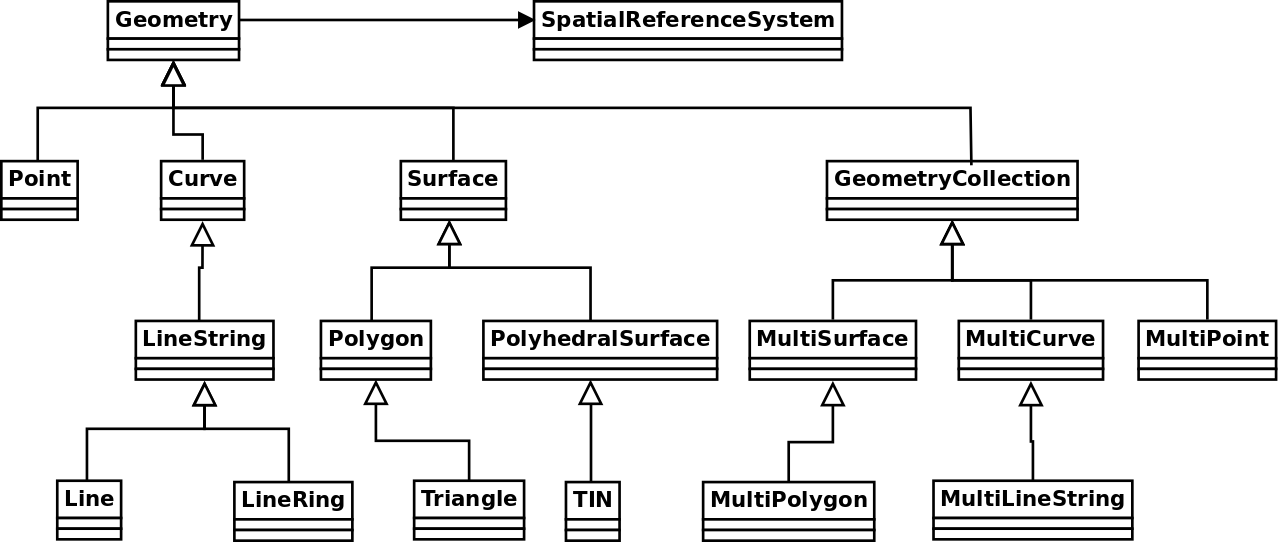
Extension of Geometry types - SQL-MM part 3 standard
Circular features are not desribed in the Simple Feature formal standard. They were described later in SQL-MM part 3 standard. We can also meet those special geometry types in databases (e.g. Oracle SDO_GEOMETRY).
CIRCULARSTRING - basic curve type as a single segment requiring three points, the start and end points (first and third) and any other point on the arc
COMPOUNDCURVE - continuous curve that has both curved (circular) segments and linear segments
CURVEPOLYGON - polygon which boundary has some compound curves
Data preparations
We will use several data sources in this lesson. First you need to download them and possibly convert them to GeoPackage.
NUTS (Nomenclature of territorial units for statistics)
NUTS shapefile can be downloaded at NUTS - choose scale 01M.
First we will create a NUTS GeoPackage file by exporting download NUTS shapefile to GeoPackage. This operation may be done in QGIS (Export -> Save features as). We name the GeoPackage nuts_osm_data because we will use the same GeoPackage also for storing OSM data. The target layer will be named as nuts. In the dialog define:
- Format - GeoPackage
- File name - output GPKG filename
- Layer name

Data from Open Street Maps
We will need several spatial layers from the Open Street Maps Project.
1) Dowload the shapefile for your country from Geofabrik.
2) Load following four OSM layers to QGIS:
- gis_osm_pois_free.shp (point)
- gis_osm_landuse_a_free.shp (polygon)
- gis_osm_railways_free.shp (linestring)
3) Export all three layers as new tables to the nuts_osm_data GeoPackage.

Tip
Select Shapefile to be converted in Browser and from contextual menu choose Export Layer -> To File.
Diving into data - simple selects
1) Open DB Manager (Database -> DB Manager) in QGIS and add a new connection to your GeoPackage nuts_osm_data (in Providers select GeoPackage and New connection). Open SQL Window and exercise your SQL knowledge.
NUTS
Look at table with administrative units.
How many features do we have for level 3?
Write down feature counts based on level code:
select "level 0" lvl, count(*) from nuts where levl_code = 0
union all
select "level 1" lvl, count(*) from nuts where levl_code = 1
union all
select "level 2" lvl, count(*) from nuts where levl_code = 2
union all
select "level 3" lvl, count(*) from nuts where levl_code = 3;
Or we can create the same better using group by clause:
OSM tables
What attributes do we have in OSM tables?
How many features do we have?
Task
Select cinemas from pois table and vizualize query result in QGIS map canvas.
Basic queries on geometries
In which coordinate system data are?
Important
NUTS are in a different coordinate reference system (CRS) than OSM data.
Which geometry type our data have? st_geometrytype
Which geometry dimensions do we have? st_dimension
We can compute the centroid of polygon features using st_centroid. Compute a centroid for the selection of landuse.
-- compute a centroid = point which is the geometric center of mass of a geometry
select fid, st_centroid(geom) as centroid, name from landuse where fclass = 'vineyard';
We can obtain minimum bounding box using st_envelope. Compute a minimum bounding box for the selection of nature reserve polygons.
select landuse.fid, geom, st_envelope(geom) nature_area_envelope
from landuse
where fclass = 'nature_reserve'
limit 10;
Is geometry valid? We can find out using st_isvalid function.
We can transform geometries into target CRS using st_transform function.
select fid, st_srid(st_transform(railways.geom, 3035)) geom_trans
from railways
where fclass = 'rail';
Warning
If we have problems with launching transform methods, we might not have all SpatiaLite tables avaliable. We need to start the command InitSpatialMetadata().
Find the area in square meters which is covered by Prague NUTS envelope (function st_area).
Task
Compare the computed area with Prague NUTS region area.
Count the length of railways according to selected types (function st_length).
SELECT fclass, st_length(st_transform(geom, 3035))
FROM railways
where fclass in ('tram', 'subway', 'funicular')
group by fclass;
Create the buffer of 100 m around railways (limit rows by 10). We will use st_buffer function.